mirror of
https://github.com/handsomezhuzhu/handsomezhuzhu.github.io.git
synced 2026-02-20 11:50:14 +00:00

113 lines
2.5 KiB
Markdown
113 lines
2.5 KiB
Markdown
# 我的个人博客
|
||
|
||
本项目基于 [VitePress](https://vitepress.dev/) 构建,并使用了 [@sugarat/theme](https://theme.sugarat.top/) 主题。
|
||
|
||
## 安装与启动
|
||
|
||
**1. 环境准备**
|
||
|
||
请确保你的环境中已经安装了 [Node.js](https://nodejs.org/en/) (版本 >= 18) 和 [pnpm](https://pnpm.io/installation)。
|
||
|
||
```sh
|
||
# 安装 pnpm
|
||
npm i -g pnpm
|
||
```
|
||
|
||
**2. 安装依赖**
|
||
|
||
你可以使用 `pnpm` 或者 `bun` 来安装项目依赖。
|
||
|
||
```sh
|
||
# 使用 pnpm
|
||
pnpm install
|
||
|
||
# 或者使用 bun
|
||
bun install
|
||
```
|
||
|
||
**3. 本地开发**
|
||
|
||
执行以下命令启动本地开发服务器:
|
||
|
||
```sh
|
||
pnpm dev
|
||
```
|
||
|
||
**4. 项目构建**
|
||
|
||
构建用于生产环境的静态文件:
|
||
|
||
```sh
|
||
pnpm build
|
||
```
|
||
|
||
**5. 本地预览**
|
||
|
||
在本地预览构建后的产物:
|
||
|
||
```sh
|
||
pnpm serve
|
||
```
|
||
|
||
## 主题与更新
|
||
|
||
### 更新主题
|
||
|
||
本项目使用 `@sugarat/theme` 主题,要升级到最新版本,请执行:
|
||
|
||
```sh
|
||
pnpm add @sugarat/theme@latest
|
||
```
|
||
|
||
### 更新 VitePress
|
||
|
||
通常,主题包会依赖最新的 VitePress 版本。如果你需要手动更新 VitePress,可以执行:
|
||
|
||
```sh
|
||
pnpm add vitepress@latest
|
||
```
|
||
|
||
## Github Pages 部署
|
||
|
||
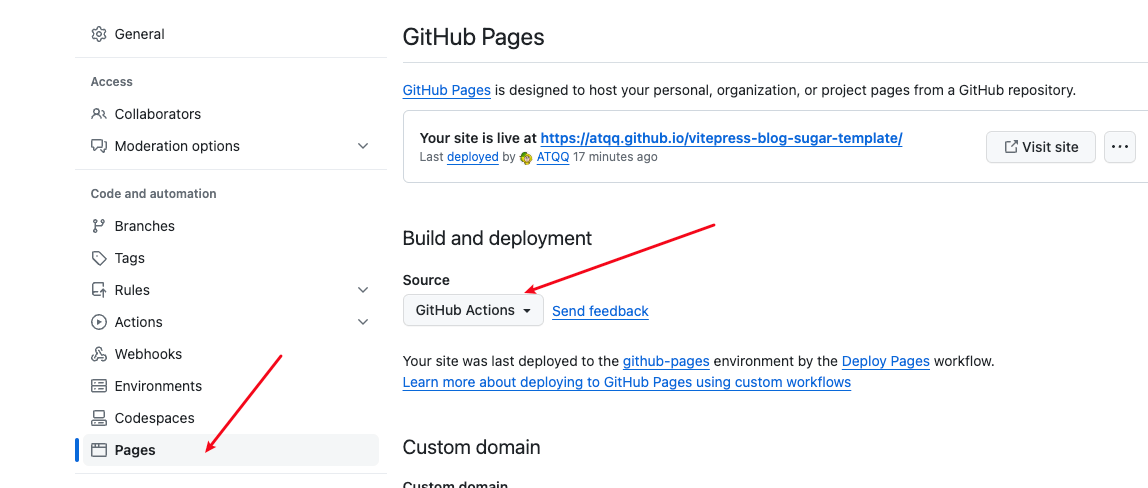
① 开启 Github Pages 的 Git Actions 部署支持。
|
||
|
||
|
||
|
||
② 复制 `.github/workflows/deploy.yml` 文件到你的项目相同目录下(如果已有则忽略)。
|
||
|
||
③ 修改 `docs/.vitepress/config.mts` 里的构建配置 `base`。
|
||
|
||
**如果你的仓库名是 `username.github.io`,则不需要修改 `base`,保持默认值 `/` 即可。**
|
||
|
||
否则,需要将 `base` 修改为 `"/仓库名/"`。
|
||
|
||
```ts
|
||
// docs/.vitepress/config.mts
|
||
import { defineConfig } from 'vitepress'
|
||
|
||
export default defineConfig({
|
||
// ... 其他配置
|
||
base: '/你的仓库名/',
|
||
})
|
||
```
|
||
|
||
④ 推送代码到 `main` 分支即可触发自动部署。
|
||
|
||
如果需要进一步修改部署和构建配置,请直接编辑 `.github/workflows/deploy.yml` 文件。
|
||
|
||
## 阿里云 ESA 部署
|
||
|
||
为了在阿里云 ESA(函数与 Pages)中完成一键部署,项目根目录新增了 `esa.json` 配置文件,内容包含安装命令、构建命令、输出目录及 Node.js 版本要求。ESA 会自动读取这些信息完成依赖安装和静态产物构建,无需额外脚本:
|
||
|
||
```json
|
||
{
|
||
"installCommand": "npm install",
|
||
"buildCommand": "npm run build",
|
||
"outputDirectory": "docs/.vitepress/dist",
|
||
"nodeVersion": "18.20.4"
|
||
}
|
||
```
|
||
|
||
如果后续需要调整构建流程,只需按需修改对应字段即可。
|
||
|